TikTok Thumbnail Downloader
Paste a public TikTok video link and download its cover image in HD (720×1280 JPG). No login, no TikTok watermark on the cover.
How to download a TikTok thumbnail
The thumbnail, which TikTok also calls the cover, is a single still image attached to each video. It's what shows on a profile grid and in search. You don't need to download the video or log in to get it: the tool asks TikTok's public lookup for the cover of the link you paste and hands you the image.
- 1In the TikTok app, open the video and tap Share, then Copy link. On a computer, copy the address from the browser bar.
- 2Paste it into the box above and press Get Thumbnail. The link should look like tiktok.com/@name/video/ followed by a long number.
- 3Check the preview, then press Download HD. The cover saves as a JPG named after the creator.
The unique part of this page
TikTok thumbnail in HD: what you get, and what happens with each link type
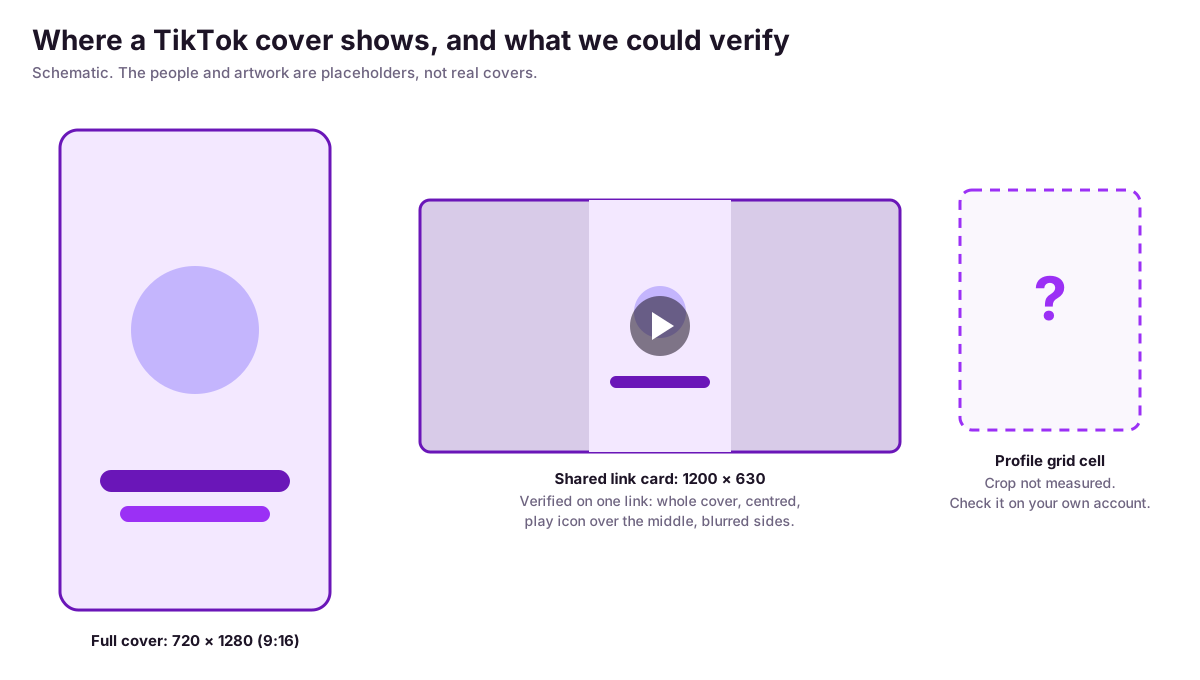
A TikTok thumbnail downloaded here is a 720×1280 JPEG in the 9:16 vertical ratio: HD, not 4K. On the public video we tested, TikTok’s preview data said 576×1024, but the file it served was the larger size. The tool does not upscale or enhance the image.
Every thumbnail downloader says “HD”. Here is what we measured so you know what to expect. That is the biggest size the tool receives, and there is no 4K or “original size” option. TikTok's own embed documentation shows the same 720×1280 size in its example thumbnail response. The image address TikTok hands out is signed and expires; on the video we checked it was valid for about two days, so download the file instead of saving the link.
| You paste | What we saw (tested 13 Oct 2026) |
|---|---|
| Public video link (tiktok.com/@name/video/…) | Cover returned. The file we measured was 720×1280 JPEG, no TikTok watermark on it. |
| Video ID that doesn’t exist or was removed | TikTok’s lookup answers with an error (HTTP 400). No image to show. |
| Photo post link (/photo/…) | The one link we tried returned the same error. We couldn’t confirm that post was live, so slideshow support is unverified. |
| Short link (vm.tiktok.com/…) | The two codes we tried were invalid and errored. A valid short link wasn’t available to test. |
| Private video | Not tested. The lookup has no login, so expect an error. |
TikTok thumbnail download without watermark
The cover image doesn’t carry the TikTok watermark that videos saved from the app typically get, but anything the creator put on the frame, such as text or a logo, stays. In our test of one public video the cover had no TikTok watermark and kept the creator’s own text overlay.
If a link fails, open it in a browser first and paste the full address from the browser bar. Short links and shared links sometimes hide the part the lookup needs.
Thumbnail, cover photo, highlight cover: the same thing?
People search for this under several names. A TikTok thumbnail, a TikTok cover photo and a TikTok cover image are the same file, and this page downloads it. A highlight cover is a different thing, covered below.
TikTok cover photo download
To download a TikTok cover photo, paste the video link into the box at the top: the tool returns the cover, the still TikTok shows on a profile grid and in search. It works for any public video, from any country. Save a cover when you want to study how a creator frames their videos, not to reuse it.
TikTok highlight cover downloader
TikTok has no Instagram-style story highlights, so a highlight cover search usually means one of three things: the cover image of a video (this tool), the round icon images people design for Instagram highlights (a design job, not a download from TikTok), or videos pinned to the top of a profile. Only the first is what this page does.
Using covers for competitor research
Covers are the one part of a competitor's video you can judge in half a second, which is why people save them. A habit that works: collect the covers of a rival account's five best and five worst videos, and compare them for text size, face placement and colour before you design your own. To find which videos are their best, the TikTok profile analyzer lists a public account's recent videos with their views. If you need hooks and not just images, the video ideas generator starts from a niche.
How do you change the thumbnail on TikTok?
On the post screen, tap Select cover to pick a frame from the video or upload an image. Creator tutorials say you can change it after posting through Edit post, then Edit cover, for roughly a week, and that desktop uploads can’t be edited. We couldn’t confirm any of that in TikTok’s Help Center, so check your app.
Plan the cover before you post, and use a downloaded cover from a rival's video only as a reference for layout, never as your own image.
TikTok cover size and thumbnail dimensions
TikTok videos are vertical at a 9:16 ratio, and the covers this tool downloads are 720×1280 pixels. For your own cover, design at 1080×1920, a size commonly used for vertical video, and keep text away from the edges because profile grids crop covers. We haven’t measured the exact crop.

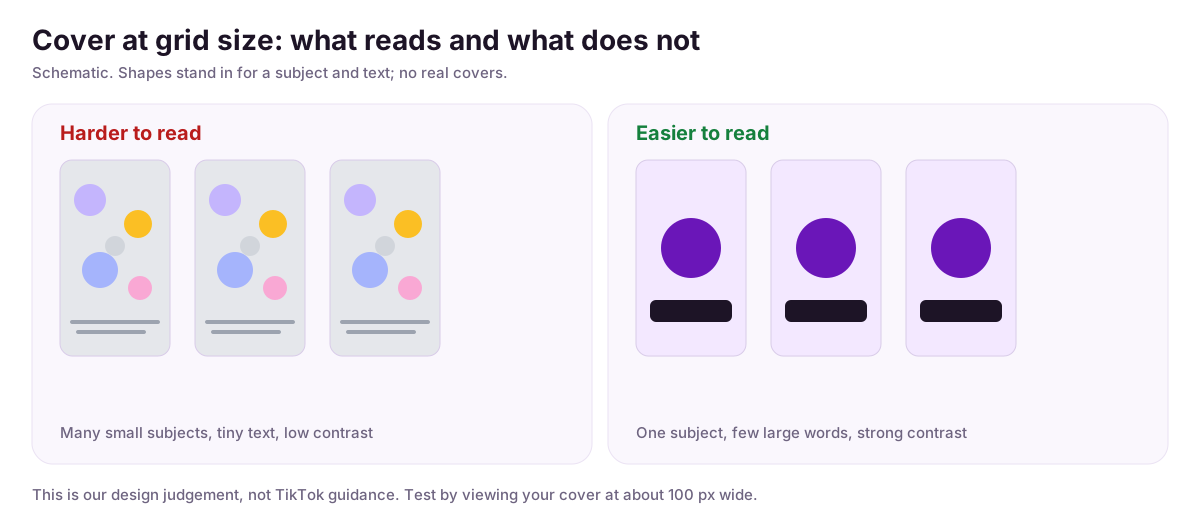
Large text with one clear subject reads better at the small size a grid uses than a busy frame does. Check TikTok's current guidance before depending on a margin; also searched as tiktok thumbnail size and tiktok video cover size.
Tips for better TikTok thumbnails
Where covers actually show, and where they don't
In the For You feed the video starts playing, so the cover is barely seen. A cover matters where people choose what to watch: a profile, search, a hashtag or sound page, or a shared link. That is also where videos end up when the feed does not pick them: TikTok says that even if a video doesn't make it to the For You feed, “people may still find it through search or by going to a creator's account” ( FYF standards). Here is what we could confirm for each surface.
- TikTok documents this
- Verified by us
- Plausible, not documented
For You feed
TikTok documents thisCover shown? No. The video plays as you scroll; TikTok describes the feed as a stream of videos.
Newsroom: a “stream of videos curated to your interests”.
A creator’s profile (the grid)
Plausible, not documentedCover shown? Yes, as a still image per video.
TikTok says people find videos “by going to a creator’s account”. We could not verify the grid or its crop.
Search results
Plausible, not documentedCover shown? Yes, as stills in the video results.
TikTok says people find videos “through search”. We could not open logged-in search.
Hashtag and sound pages
Plausible, not documentedCover shown? Yes, as stills.
Commonly reported by creators; not in TikTok’s documentation we could open.
Shared links and embeds
Verified by usCover shown? Yes. A shared link previews as a 1200×630 card with the whole cover centred and a play icon over it.
Checked on one public video’s page metadata; TikTok’s embed lookup also returns the cover as the thumbnail.
Surfaces checked on 13 October 2026. The embed behaviour is described in TikTok's embed documentation; the feed description is from the 2020 Newsroom explainer.
Design for a crop you can't see, then check it
Our design judgementWe could not measure how the profile grid crops a 9:16 cover, and TikTok's Help Center has no article on it. So don't rely on a number someone gives you. Keep text and the subject away from the very top and bottom of the frame, post, and look at your own grid on your phone. A shared link shows the whole cover, so the safest layout is one that survives both.
In the shared-link card we saw, a play icon sits over the middle of the cover, so keep the one detail that matters slightly off dead centre.
Make text readable at grid size
Our design judgementCheck your cover at about 100 pixels wide before you post. If you can't read the words at that size, nobody scrolling a profile will. A few large words beat a sentence.
One subject, strong contrast
Our design judgementA single clear subject against a plain or deliberately darkened background reads faster than a busy frame. Put light text on a dark area or dark text on a light one; text over a mixed background is the first thing to disappear at small size.
Keep a series consistent
Our design judgementReuse the same text position, colour and framing across a series so the grid reads as a set and a returning viewer can spot the next episode. Change the subject, not the layout.
Set the cover on purpose
Creators report thisCreators describe three options on the post screen: pick a frame from the video, add text in preset styles, or upload an image. They also describe editing the cover after posting for a limited time, about a week, and one post says desktop uploads can't have their cover edited. None of this is in TikTok's Help Center pages we could open, so check your own app and TikTok Studio. Steps and caveats are in the section above.
Covers belong to their creators
A cover is part of someone else's work, and it often shows faces, footage or music artwork that belong to other people. Saving one for reference or research is fine. Re-posting it as your own, or using it in an ad, needs the creator's permission. This tool only reads public videos and never logs in as you.
FAQ
Frequently asked questions
How do I download a TikTok thumbnail?
Open the video in TikTok, tap Share, then Copy link (or copy the address from your browser). Paste it into the box above and press Get Thumbnail. The cover appears with a Download HD button that saves it as a JPG.
What resolution is the thumbnail?
In our test the cover of a public video came back as a 720×1280 JPEG, the 9:16 portrait ratio TikTok videos use. TikTok's own preview data listed the same image as 576×1024, but the file it served was larger. That is the biggest size our tool receives. There is no 4K or original-size option, and we don't upscale anything.
Can I download covers from private accounts or private videos?
The lookup runs without a login, so it can only see videos anyone can open. We couldn't test a private video, but with no account involved the tool has nothing to prove access with. Expect an error, not an image.
Does it work with vm.tiktok.com short links?
The tool accepts any link on a tiktok.com domain, so a short link is passed through to TikTok. We couldn't get a live short link to test, and the two invalid ones we tried returned an error. If a short link fails, open it in a browser and paste the full address, which has /video/ followed by a long number.
What about photo posts and slideshows?
Not verified. Photo posts use /photo/ instead of /video/ in the address. The one /photo/ link we tried returned an error from TikTok's lookup, but we couldn't confirm that post was still live, so we can't say whether the tool supports slideshows. If you need the individual images from a slideshow, this tool is not built for that.
Why can't I get a thumbnail, or why did the image link stop working?
TikTok returns an error for videos it can't find, such as deleted ones or a mistyped link. Separately, the image address TikTok hands out is signed and expires: on the video we checked it was valid for about two days. Download the file you want straight away instead of saving the link.
Will the creator know I downloaded their cover?
The request goes from our servers to TikTok's public lookup and doesn't carry your TikTok account, so nothing in it identifies you to the creator. We don't have a statement from TikTok about what it logs on its side, so we can't speak for TikTok.
Can I use a downloaded cover in my own content?
Covers belong to their creators, and often include footage, faces or music artwork owned by other people. Saving one for reference, competitor research or to ask permission is fine. Re-posting it as your own, or using it in an ad, needs the creator's permission.
Is a thumbnail the same as a cover photo or a highlight cover?
Thumbnail and cover photo are the same image: the still TikTok shows for a video on a profile grid. People searching for a highlight cover usually mean one of three things: that cover image, the round highlight icons used on Instagram (a design task, not a download), or videos pinned to a profile. This tool downloads the first.
More Free Growth Tools
Free TikTok Profile & Account Analyzer
Analyze any TikTok profile free — engagement rate, average views, top videos and posting cadence. No login, no signup. Results in seconds.
TikTok Video Ideas Generator
Generate 10 structured TikTok video ideas — each with a concept title, description, and ready-to-use hook. Pick your niche, style, and audience. Free AI tool.
TikTok Profile Picture Downloader
Download any TikTok profile picture in full HD instantly. Enter a username and save the avatar — free, no app required.