TikTok Shadowban Checker
Run a free TikTok hashtag-visibility test and see exactly what it can and can't tell you, plus how to read TikTok's own Account check. No login.
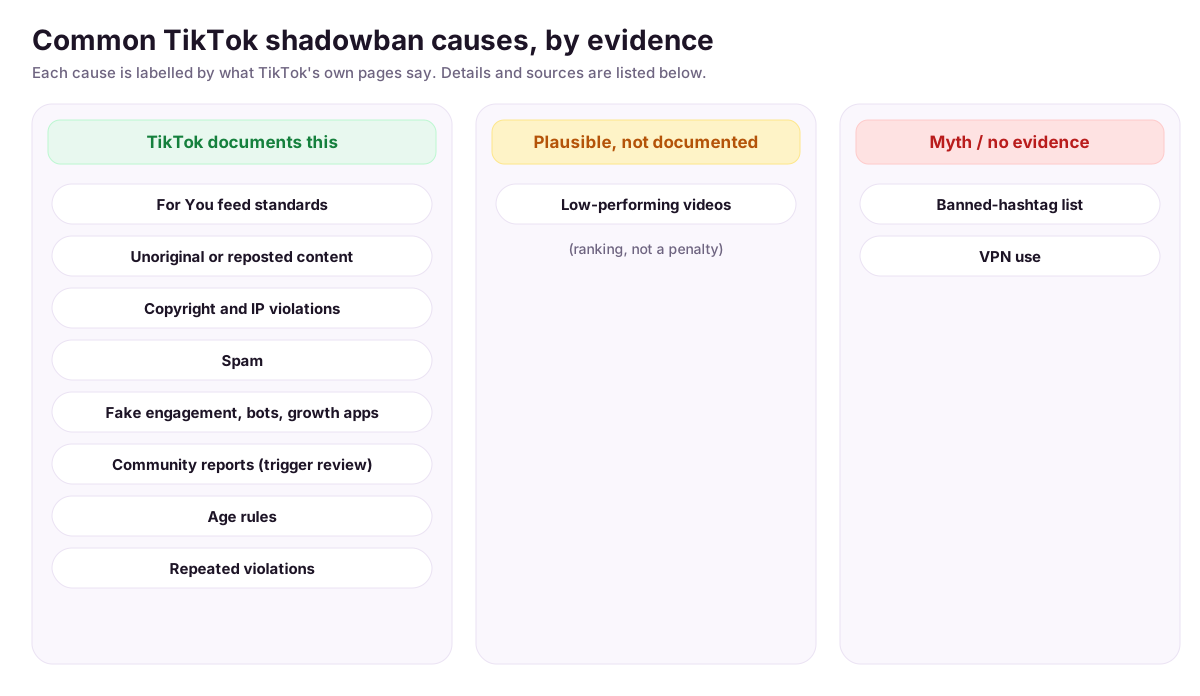
Common shadowban causes on TikTok: what is documented, what is myth
Why am I shadowbanned on TikTok? Most lists of causes are guesses repeated from one another. This one starts from TikTok's own pages and says, for each cause, whether TikTok documents it. TikTok's wording for the effect is different from “shadowban”: content that is ineligible for the For You feed (FYF) and accounts that become “harder to find”.
- TikTok documents this
- Plausible, not documented
- Myth / no evidence
Two numbers that frame the causes
- Most enforcement is automated. In its January to March 2026 enforcement report, TikTok says automated removals, including by AI, “now make up more than 96% of total removals” (Community Guidelines Enforcement Report). Its enforcement page says content “first goes through an automated review process”, with additional review “if content gains popularity or has been reported” (Enforcement). Reports are one trigger among several, not the only way a video gets looked at. The report's charts do not break out reports versus proactive detection in text we could quote, so we don't.
- Dips are normal. Across 2,954 videos from 546 creators in 2026, 12.9% got under 20% of the creator's baseline (the median of their previous 5 videos), and only 4.0% of creators had three such videos in a row. Normal dips, not shadowbans. TikTok's own FYF standards say: “If a video isn't getting many views, it also doesn't necessarily mean it broke a rule.”
Content the For You feed standards leave out
TikTok documents thisWhat TikTok says: TikTok keeps eligibility standards for the FYF and makes “ineligible for the FYF certain content that may not be suitable for a broad audience” (FYF standards). Examples in the guidelines: misinformation that may cause moderate harm (Integrity and Authenticity) and activities that “may lead to moderate physical harm” (Dangerous Activity and Challenges). Unlabeled AI-generated or heavily edited content showing realistic scenes or people “may be removed, restricted, or labeled”.
Check on your account: Open TikTok Studio, then Analytics, open the post and look for the ineligible-for-recommendation notice. TikTok says that is where this decision is shown.
Unoriginal or reposted content
TikTok documents thisWhat TikTok says: “Content is also ineligible for the FYF if it includes unoriginal or reused material without anything new” (Integrity and Authenticity). In its recommendation explainer TikTok adds: “We also don't recommend duplicated content, content you've already seen before, or any content that's considered spam” (Newsroom, 2020).
Check on your account: Look at recent videos that are a clip from someone else, a compilation, or a re-upload of your own post. If it adds nothing new, expect it to be a candidate.
Copyright and intellectual-property violations
TikTok documents thisWhat TikTok says: “You should only post content you created or have the right to share” (Integrity and Authenticity). TikTok lists “multiple violations of our Intellectual Property Policy” among reasons it may permanently ban an account (Content violations and bans).
Check on your account: Check your Inbox, then System notifications, then Account updates for notices, and look at which sounds or footage you did not create.
Spam
TikTok documents thisWhat TikTok says: Spam is named among deceptive behaviours TikTok does not allow: “covert influence operations, impersonation, spam, fake reviews” (Integrity and Authenticity). The recommendation explainer says spam is not recommended (Newsroom, 2020). TikTok does not publish a numeric threshold for posting frequency or repeated captions.
Check on your account: Reread your last posts and comments for copy-pasted text, mass-posted near-duplicates and anything promotional that looks the same every time.
Fake engagement, bots and third-party growth apps
TikTok documents thisWhat TikTok says: TikTok does not allow “the trade of services that artificially boost engagement or trick the recommendation system” and “strictly prohibit[s] automation tools, scripts, or other tricks designed to bypass our systems”. A restricted account “could include limiting your ability to post new content, appear in top search results, or in the FYF” (Integrity and Authenticity). TikTok does not name specific apps.
Check on your account: Look at third-party apps connected to your account and at any follower or like purchases. Remove access you don't need.
Community reports
TikTok documents thisWhat TikTok says: “If a report is submitted, we'll review the reported content to check if it violates our policies.” A report can lead to FYF ineligibility only for the listed content areas, and TikTok “will never include information about who reported their content” ( Reporting on TikTok). We found no TikTok statement that a number of reports alone reduces reach.
Check on your account: Check for a notice on the specific post. A report only matters if the content actually breaks a rule.
Age rules
TikTok documents thisWhat TikTok says: TikTok sets age limits for some features, “like needing to be 16+ for your videos to appear in the FYF” (Youth Safety). Content that is age-restricted is made “viewable only for adults” (Community Guidelines), and accounts under the minimum age are banned (Accounts and Features).
Check on your account: Check the age on the account. If your content is age-restricted by type, expect a smaller audience.
Repeated violations and your account status
TikTok documents thisWhat TikTok says: Account status “reflects your violation history across TikTok over the last 90 days” and can be Healthy, Fair, Severe or Banned; violations expire after 90 days (Content violations and bans). Separately: “Sometimes, accounts that don't break the rules still post a lot of content that's ineligible for the FYF. In those cases, we may make the account and its content ineligible for the FYF and harder to find” ( Accounts and Features).
Check on your account: Open Account check and read the status record. Two or three flagged posts in the same area is a pattern worth fixing.
Banned hashtags
Myth / no evidenceWhat TikTok says: TikTok's Help Center has a “Report a hashtag” flow (listed in the Help Center menu), so a hashtag can be reported. We found no TikTok page that publishes a list of banned hashtags, or that says using one limits your account. TikTok does say captions, sounds and hashtags are used as video information in recommendations (Newsroom, 2020), which is relevance, not a penalty.
Check on your account: Nothing to look up. If a hashtag's page shows no results, that is about the hashtag. One post with and without it proves nothing either way.
Using a VPN
Myth / no evidenceWhat TikTok says: TikTok lists “device and account settings like your language preference, country setting, and device type” as recommendation factors that “receive lower weight” than other signals (Newsroom, 2020). We found no TikTok page saying VPN use restricts an account or its reach.
Check on your account: Nothing to fix. Compare your recent views with your own usual range instead of blaming connection settings.
Low-performing videos
Plausible, not documentedWhat TikTok says: TikTok describes ranking by predicted interest, where “a strong indicator of interest, such as whether a user finishes watching a longer video from beginning to end” weighs more than a weak one, and says that “neither follower count nor whether the account has had previous high-performing videos are direct factors” (Newsroom, 2020). Videos people skip reach fewer people. That is ranking, and TikTok does not document it as a penalty that carries over to your later videos.
Check on your account: In Analytics, compare how long people watch your recent videos with your usual range before assuming a restriction.
Sources opened on 13 October 2026. The Community Guidelines pages are the version TikTok marks as released 25 August 2026; the recommendation explainer is from 2020, so check it against TikTok's current pages.
How to get rid of a shadowban on TikTok
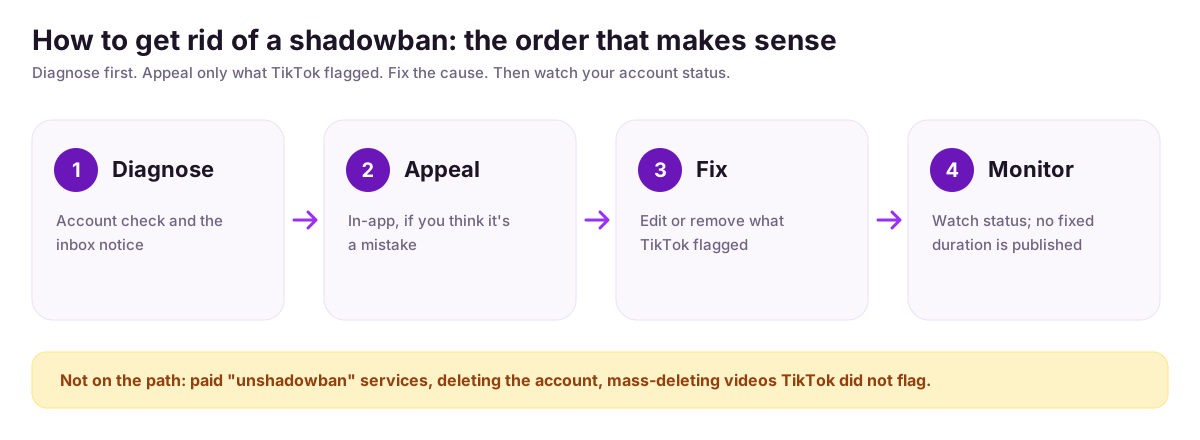
How to get unshadowbanned on TikTok depends on what TikTok documents: it may restore your account automatically, depending on how much of your content isn’t suitable for the For You feed, or you can appeal from the notice in your inbox or the post’s Analytics page. TikTok publishes no shortcut and no fixed duration.
- TikTok documents this
- Plausible, not documented
- Myth / no evidence
- 1
Check Account check and your inbox notice
TikTok documents thisOpen Profile, the menu, TikTok Studio, More tools, then Account check. Then look in your Inbox for a notice, and for an Ineligible for recommendation label below your username (Your account status, Why is my account not being recommended?). If neither shows anything, TikTok has not flagged the account this way and the next steps do not apply: look at your views against your usual range instead.
- 2
Appeal in the app
TikTok documents thisFor an account notice: Inbox, tap the notification, View more, review the ineligible videos, then Appeal. You can also tap the notice below your username on your Profile.
For a single post, turn on Analytics first (TikTok Studio, Analytics, Get started, Turn on). Then open the post, tap More insights or the three dots, tap Analytics, tap the notification for the ineligible post and tap Appeal. TikTok says that if the appeal succeeds, the post becomes eligible for the For You feed (Content violations and bans).
- 3
Remove or edit what TikTok flagged
Plausible, not documentedTikTok documents thisReview the videos TikTok named. That fixing or removing them lifts a restriction is plausible but not something TikTok documents. What it does document:
Deleting your violative content does not remove the violation, and we may still reduce your account status and/or impose restrictions after you delete violative content
(Content violations and bans). So deleting is not an appeal. - 4
Stop the behaviours from the causes list
TikTok documents thisTikTok says it “may automatically restore your account to good standing at any time, depending on how much content on your account isn't suitable for the For You feed” (Why is my account not being recommended?). In practice that means working through the causes above that apply to you: reused or reposted material, automation tools and growth apps, unlabeled AI content, and any content in the areas the guidelines list.
- 5
Know what to expect
TikTok documents thisTikTok publishes no fixed duration for being ineligible for the For You feed, so any exact number of days you read elsewhere is not from TikTok. Separately, violations on your account record expire after 90 days and stop counting (Content violations and bans). Check back in Account check rather than guessing.
- 6
What not to do
Myth / no evidenceTikTok documents this- Paid “unshadowban” services. Myth / no evidence. TikTok documents no such service, and a flag set by TikTok can't be changed from outside. TikTok also prohibits “the trade of services that artificially boost engagement or trick the recommendation system” ( Integrity and Authenticity).
- Deleting the account and starting over. Documented. TikTok says “we may restrict or permanently ban your account if you make any attempts to avoid a restriction or ban imposed on another account you own” (Content violations and bans).
- Mass-deleting videos TikTok did not flag. Myth / no evidence. We found nothing from TikTok saying it helps, and deleting does not remove a violation (see step 3).
Steps from TikTok's Help Center, opened on 13 October 2026. App menus change, so follow the current labels in your app.
How do I know if I'm shadowbanned on TikTok?
Check TikTok itself first. If your account is ineligible for recommendation, TikTok says it notifies you in your inbox and shows an Ineligible for recommendation notice under your username. Then open Account check in TikTok Studio. Low views alone prove nothing, because reach varies a lot between videos.
Searches like am i shadowbanned on tiktok and is my tiktok shadowbanned come down to the same two checks: TikTok's own notice and Account check below, then a comparison of your recent views with your usual range. The checker further down adds a third, weaker signal.
What is a shadowban on TikTok?
Shadowban is the popular name for TikTok limiting how widely your videos are shown. TikTok’s help pages don’t use the word; they describe accounts that repeatedly post content unsuitable for the For You feed being kept out of that feed and made harder to find in search.
If it happens to you, TikTok says it notifies you in your inbox and shows an Ineligible for recommendation notice under your username, and you can appeal. It may also restore the account on its own depending on how much of your content isn't suitable. That, not a mystery penalty for low views, is the closest official description of a shadowban.
What does “ineligible for recommendation” mean on TikTok?
Ineligible for recommendation means TikTok has decided your account or videos shouldn’t appear in the For You feed. Per TikTok, it notifies you in your inbox and under your username, shows which videos were flagged, and lets you appeal. It may also restore the account automatically, depending on how much content is unsuitable.
The notice appears in your Inbox and on your Profile below your username. Opening it shows the flagged videos, with an Appeal button at the top; the steps are in the FAQ below. If you see no notice, TikTok hasn't flagged the account this way.
TikTok Account check: how to find it and what it shows
It takes under a minute and it is the only check that reads TikTok's own data:
- 1In the TikTok app, tap Profile at the bottom.
- 2Tap the menu (☰) at the top, then TikTok Studio.
- 3Under More tools, tap Account check.
- 4A checkmark next to a feature or post means no issue; a warning sign means there is one.
You can also reach it through Profile, menu, Settings and privacy, Support, Safety Center, Account check. It lists restrictions on logging in, posting, commenting, editing your profile and sending messages. It doesn't report reach, so a clean Account check and weak views can both be true. Separately, look in your Inbox for a recommendation notice, and appeal there if you disagree.
The unique part of this page
What this checker does, step by step
We'd rather you know exactly how thin this test is than trust a verdict.
- 1It reads your most recent public posts, up to 12.
- 2It finds the three hashtags you use most in those posts’ captions.
- 3For each hashtag, it pulls up to 50 posts from that hashtag’s feed.
- 4It checks whether any of those posts are yours. All three feeds: not shadowbanned. Some: partial. None: shadowbanned.
| Result | What it means | What it doesn't mean |
|---|---|---|
| Not shadowbanned | Your posts showed up in all three hashtag feeds we sampled. | It doesn’t prove your reach is normal. It says nothing about the For You feed or your view counts. |
| Partial | Your posts showed up in some of the three feeds and not others. | Often just means one hashtag is much busier than another. |
| Shadowbanned | None of your posts appeared among the 50 we pulled from each of the three feeds. | This is the weakest verdict. With big hashtags it is a common result for accounts with no restriction at all. |
What it can't detect
- Whether the For You feed shows your videos. Nothing here looks at recommendations.
- Your view counts. The tool never reads them, so it can't tell a dip from a normal week.
- Anything TikTok has flagged. That lives in the Account check and your inbox, not on public pages.
- Big-hashtag accuracy. Fifty posts is a small slice of a feed that gets new posts constantly. A busy hashtag can leave a perfectly healthy video out of the sample, so a failed check on #fyp or a similar tag says little.
We use the same hashtag method for the Instagram shadowban checker, with the same limits. The verdict is free; the per-hashtag table and tips sit behind a free email sign-up.
Why am I not getting views on TikTok?
Low views often have ordinary causes: reach varies a lot from video to video, and a topic or format that stops working can drop every video at once. A shadowban is only one possible reason. Check Account check and your inbox for a notice first, then compare your last ten videos with your usual range.
A check you can do by hand: the usual symptom people report is views that suddenly fall. Reach on TikTok swings a lot from video to video, so one weak post means little. A better question is whether all your recent videos fell below your own normal. List the views of your last 10 to 20 videos, find the middle value, and compare your newest five against it. If the newest five are far below the middle and your Account check or inbox shows a notice, you have a real lead. If there is no notice, look at what changed first: topic, posting rhythm, reused clips or audio.
The TikTok profile analyzer lists a public account's recent videos with views, and the engagement rate calculator helps you compare accounts of different sizes.
Shadowban checker, detector, test: the same thing
Searches like tiktok shadowban check, shadowban detector, am i shadowbanned on tiktok and tiktok shadow ban checker all lead to tools that answer the same question, and none of them can read TikTok's internal recommendation status. The only source for that is the Account check above.
FAQ
Frequently asked questions
Does TikTok officially have shadowbans?
The help pages we read don't use the word. TikTok says it may restrict unsuitable content from the For You feed and make accounts that repeatedly post it harder to find, so their posts won't appear in the For You feed and are harder to find in search. That is the closest official description.
What does this checker actually test?
It reads your latest public posts (up to 12), picks your three most-used hashtags, then checks up to 50 posts in each hashtag's feed for yours. All three found means not shadowbanned, some means partial, none means shadowbanned. It never reads your view counts, account status or TikTok's recommendation system.
Why could a healthy account fail the test?
Because 50 posts is a tiny slice of a hashtag feed. Popular hashtags such as #fyp get new posts constantly, so your video can be live and still miss the 50 the test pulls. A fail on a big hashtag is common for healthy accounts, so treat the result as a hint, not a diagnosis.
My videos are stuck at around 200 views. Am I shadowbanned?
Not necessarily. Compare your last ten videos with your own usual range: if one or two dipped, that is ordinary variation. If every recent video fell well below what you normally get, check the Account check and your inbox for a notice, and look at what changed (posting frequency, new audio or topic, reposted content).
How long does a TikTok shadowban last?
TikTok doesn't publish a fixed duration. Its help page says it may automatically restore an account to good standing at any time, depending on how much content isn't suitable for the For You feed, and otherwise you can submit an appeal. Any exact number of days you read elsewhere isn't sourced from TikTok.
Can I appeal if my account is ineligible for recommendation?
Yes. Per TikTok's help page: open Inbox, tap the notification, tap View more, review the ineligible videos and tap Appeal. Or open your Profile, tap the Ineligible for recommendation notice below your username and tap Appeal. You'll only see these options if TikTok has actually flagged your account.
Do I need to log in or give you my password?
No. You enter a username and the tool looks at public posts, so there is no login and nothing to authorise. The verdict is free. The per-hashtag breakdown and the tips below it sit behind a free email sign-up, which is separate from your TikTok account.
Should I stop using hashtags if the test fails?
The tips in the unlocked report are general advice, such as pausing hashtags for a few days, and we haven't found a TikTok source showing it clears a restriction. Treat it as housekeeping, not a fix. If TikTok has flagged your account, the appeal route is the one TikTok describes.
Is there a version for Instagram?
Yes. The Instagram shadowban checker runs the same kind of hashtag check on Instagram posts: it samples hashtag feeds and looks for your posts. It has the same limits, because a missing post in a busy hashtag feed isn't proof of a restriction. It is a separate tool with its own page. Instagram shadowban checker.
More Free Growth Tools
Instagram Shadowban Checker
Check instantly if your Instagram account is shadowbanned. Free hashtag-based test — no login required.
Free TikTok Profile & Account Analyzer
Analyze any TikTok profile free — engagement rate, average views, top videos and posting cadence. No login, no signup. Results in seconds.
TikTok Engagement Rate Calculator
Calculate your TikTok engagement rate instantly. Enter views, likes, comments, shares and saves to benchmark your video performance.